
You may be running low on resources and tired of having to chop and mine to get them yourself.
The good news is that you can have workers get those resources for you.
In this survival guide, we’ll show you how to deliver resources to your warehouse in Wild West Dynasty.
Buy A Cart To Start Your Transfer Route
In order to deliver resources to your warehouse, you’re going to need a cart.
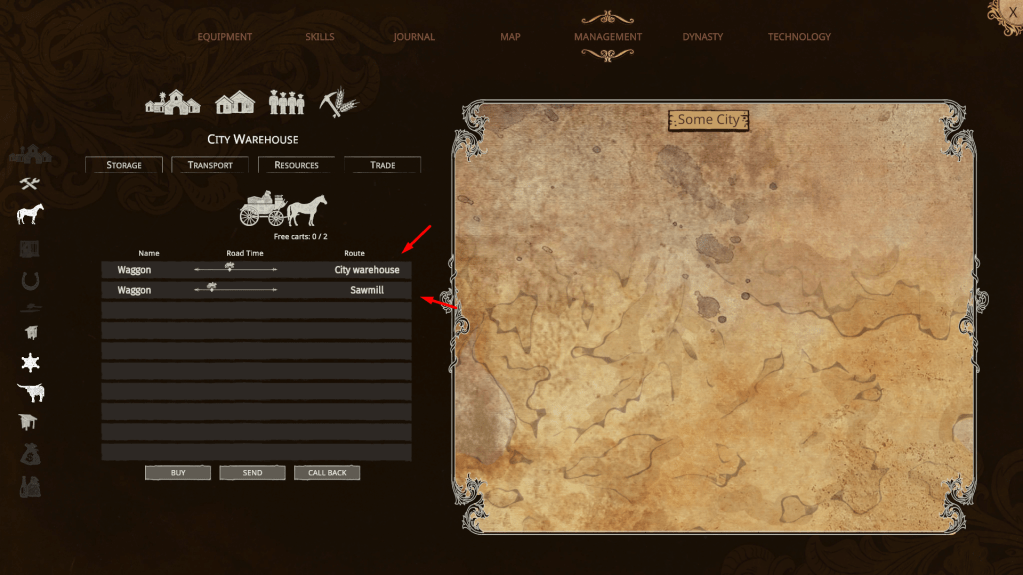
You can buy a cart in the Management tab.
Hit the tab, then click on your city.
At the top, you’ll see a Transfer option.

Click that, and you’ll see an option to buy a cart.
Currently, carts cost $100, and they don’t have different options.
That may change in a future update, however.
If you don’t have money, then start selling items or get yourself some tenants in your city.
They can pay you rent which will quickly earn you money each day.
How To Set Up Transferring Resources in Wild West Dynasty
Once you have carts, you’re able to send them to your different production buildings.
To do so, you’re going to click the “Send” option at the bottom of the same menu where you bought the carts.

A new UI will pop up that gives you the opportunity to select what production building you want to get resources from.
When you select it, the cart will start to take items from the production building to your warehouse.
Keep in mind that the cart only works during work hours.
So, if it’s between 18:00 and 10:00 hours, then you won’t see them loading resources into your warehouse.
Conclusion
Having your workers gather resources for you can make your time in Wild West Dynasty easier.
Follow the steps above to have your carts start filling your warehouse with resources.
Be sure to watch the video below for a visual walkthrough of the process.




 Survival Game Guide
Leave a comment